

by the Tango Team
May 31, 2026
How to Start Live Streaming: Tango’s Beginner’s Guide
New to live streaming? This beginner's guide walks you through everything: setup, your first stream, how to earn, and the mistakes to avoid from day one.
Live streaming has moved from a niche hobby to mainstream, and if you’re wondering how to start live streaming, you’re in exactly the right place. The global live streaming market is projected to surpass $250 billion by 2029 (Grand View Research), and a growing share of that growth comes from individual creators connecting with audiences in real time from their phones.
In 2026, creators, musicians, performers, and everyday people are all going live to build audiences and earn money on platforms like Tango. If you’ve been watching others stream and thinking, “I’d love to do that, but I have no idea where to start”, this guide is for you.
We’ll walk through what live streaming actually is, what you need to get started, the exact steps to go live, the most common beginner mistakes, and what your first month should look like.
What Is Live Streaming?
Live streaming is the real-time broadcast of video content over the internet. Instead of recording, editing, and uploading later, live streaming lets you press “Go Live” so your viewers see you in the moment, not hours or days later.
The big difference compared to pre-recorded content is interaction:
-
Viewers can comment, send reactions and gifts while you’re live
-
You can answer questions on the spot and adjust your content based on their responses
-
There’s a sense of “we’re in this moment together” that pre-recorded videos rarely create
| Feature | Pre-recorded video | Live streaming on Tango |
| Interaction | Delayed: reading comments later | Real-time: instant chat and reactions |
| Effort | High: scripting, filming, editing | Low: just press Go Live and be yourself |
| Monetization | Slow: requires ads and high views | Fast: direct gifts from day one |
| Vibe | Polished: feels like a “show” | Authentic: “We’re in this together” |
Popular live streaming platforms in 2026 include Tango, Twitch, YouTube Live, and TikTok Live. Each has its own culture, features, and audience. Tango is especially strong for mobile creators, 1-to-1 and small-group interactions, and creators who want to monetize through gifts and rewards.
Why Start Live Streaming Now?
You might be wondering if it’s “too late” to start. It isn’t. The landscape is more crowded, but the demand for real, unscripted connections is higher than ever.
Here’s why people are starting live streams now:
Deeper connection with your audience
Live allows you to have real conversations, not just comments on a post. Viewers feel like they know you. That relationship is far harder to build through edited, polished content.
Monetization opportunities
On platforms like Tango, viewers can send digital gifts during your stream. These convert to diamonds, Tango’s virtual currency, which you can cash out as real money. You don’t need a million followers to start earning; you just need engaged fans. See our full guide to live streaming monetization on Tango to understand exactly how the earnings system works.
Flexible formats that suit your personality
You can host Q&A Sessions, music sessions, gaming streams, tutorials, “study with me” sessions, or simply casual chats. Live streaming has room for introverts, extroverts, and everyone in between.
What Kind of Streamer Are You?
Most successful streamers fall into one of four types:
-
The Entertainer - funny, energetic, loves to perform think karaoke streams and reaction videos)
-
The Chatter - warm and social, thrives on conversation, a coffee chat or Q&A is their natural home.
-
The Educator - loves to teach and share knowledge, tutorials and how-to sessions work best.
-
The Performer - musical or artistic live music sets, art streams, dance.
You might be a mix of two, and your style will evolve naturally as you stream more. The point is to start with a format that feels comfortable, so you’re not completely winging it on day one.
What You Need to Start Live Streaming with Tango
You really don’t need a complicated setup. Think in four buckets: platform, equipment, internet, and mindset.
A reliable live streaming platform
Your live streaming platform affects how easy it is to go live, what tools you have to interact with viewers, how you earn money, and how new viewers discover you.
For beginners, look for:
-
Simple, responsive interface that doesn’t require a desktop setup
-
Built-in audience tools (chat, reactions, battles, events)
-
Clear monetization system (gifts, subscriptions, rewards)
-
Supportive community and moderation tools
Tango ticks these boxes especially well for new streamers. It’s built mobile-first, meaning your phone's camera is all you need to get started. On Tango, you’re not at a disadvantage compared to desktop streamers. The platform is designed around real-time connections, and its diamonds-and-gifts system makes it easy to understand how you get paid fast.
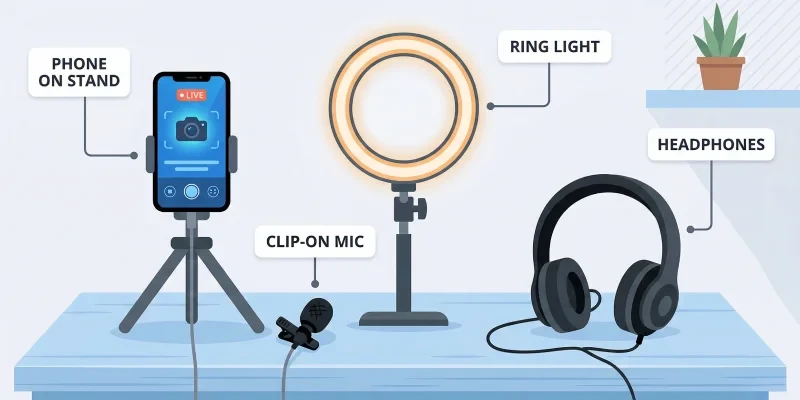
Basic Equipment Setup
You can absolutely start with minimal gear:
-
Smartphone or webcam - on Tango, your phone is all you need
-
Microphone - your built-in mic works, but even a small clip-on mic will make a real difference. If you want to upgrade, TechRadar has rounded up the best microphones for streaming at every budget
-
A basic ring light - face your light source rather than having it behind you
-
Optional extras - headphones and a simple backdrop for a cleaner look
Stable Internet Connection
A choppy stream means people are leaving. Aim for at least 10 Mbps upload speed for a smooth broadcast. You can check yours at Speedtest.net before going live.
Your Mindset
Tech aside, you’ll also want:
-
A rough idea of what you’ll do on stream
-
A sense of who you’d like to talk to (gamers, music lovers, people from your country, etc.)
-
Realistic expectations - your first stream is about learning, not going viral
How to Start Live Streaming in 7 Simple Steps
-
Choose your platform - Decide where you want to stream. If you want real interaction and a platform built around live conversation on mobile, Tango is a strong choice. Download it from Google Play or install it on iOS (EU Only) from the Onside Store.
-
Create your account and profile - choose a clear username, add a visible profile photo, and write a short bio explaining what viewers can expect.
-
Set up your space and equipment - find a quiet spot, stabilise your phone, and check your background.
-
Test your setup - Run a quick test stream to check audio, video, and connection. Before going live, run through our pre-stream checklist to ensure nothing is missed.
-
Decide on a theme for your first stream: Keep it simple. Not sure what to do? The table below has you covered.
| Stream format | Difficulty | Preparation needed |
| “Get to know me” Q&A | ★ Easy | Just a few talking points |
| Coffee chat | ★ Easy | A comfortable chair and a mug |
| Karaoke session | ★★ Medium | A playlist and a decent mic |
| Gaming session | ★★★ Hard | Game setup and stable internet |
-
Tell people you’re going live - Share the time and platform on social media and in group chats. For a full strategy, see our guide to promoting your Tango streams without spending a penny.
-
Go live and talk to your viewers - Greet people by name, explain the stream, ask simple questions, and don’t stress about low numbers. Your first stream is a practice run.
Beginner Mistakes Explained (with Examples)
Everyone makes mistakes at the start. The good news is that most are easy to fix once you’re aware of them.
Mistake 1: Ignoring the Chat
What it looks like: You’re so focused that you barely look at the chat. Messages pile up, viewers feel invisible, and quietly leave.
Why it’s a problem: Live streaming is about interaction. Viewers could watch a pre-recorded video if they wanted zero interaction.
How to fix it: Build brief pauses into your content flow to check the chat regularly. Even a simple “let me see what people are saying” works.
Mistake 2: Poor Lighting and Audio
What it looks like: You’re barely visible, the camera is facing a bright window behind you, or your audio is muffled and full of background noise.
Why it’s a problem: Viewers decide very quickly whether a stream feels “watchable”. If they can’t see or hear you properly, they won’t stay.
How to fix it: Face your light source rather than having it behind you. Use headphones or even a simple wired earphone mic.
Mistake 3: Overcomplicating the Setup
What it looks like: You spend weeks reading gear reviews, trying multiple apps, and changing your layout again and again. You never go live because you’re waiting for the “perfect” setup.
Why it’s a problem: Your audience can’t grow if you never stream. Over-engineering the tech can be a way to delay getting started.
How to fix it: Decide on a basic setup, commit to it for your first 10 streams, and only then consider upgrades. Not sure what formats work best? See popular live streaming styles on Tango for inspiration.
Mistake 4: Going Live Without a Plan
What it looks like: You hit “Go Live” with no idea what you’ll talk about. You end up saying “ummm” a lot, refreshing viewer numbers and feeling awkward.
Why it’s a problem: If you feel lost, your viewers feel it too. They’re less likely to follow or come back.
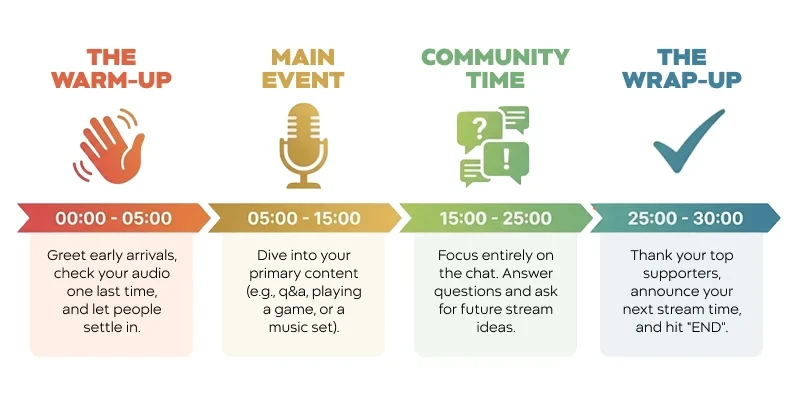
How to fix it: Prepare a simple outline beforehand, even just 4 phases:
-
0-5 minutes: intro and welcome
-
5-15 minutes: main topic (Q&A, game, music, etc.)
-
15-20 minutes: chatting, asking viewers what they want next time
-
20-25 minutes: wrap-up and goodbye
Mistake 5: Not promoting your stream beforehand
What it looks like: You go live at a random time with no announcement. You wait for viewers who never come, feel discouraged, and wonder if streaming is “worth it”.
Why it’s a problem: Even a small heads-up, a story, a post, a message to friends, can double your initial viewer count. Discoverability takes time; early momentum is everything.
How to fix it: Post your stream schedule 24-48 hours in advance. Tell people the topic, the time, and what to expect. See our full guide on promoting your Tango streams on social media.
How to Grow in Your First Month of Live Streaming
You’re not just starting one stream, you’re starting a habit. Here are the practices that separate streamers who grow from those who quit after three sessions:
Set a consistent schedule
Choose 2-3 regular time slots per week and stick to them. Viewers are far more likely to return if they know when to find you. Think of it like a TV show, same time, same place, every week.
Experiment with formats
Try a Q&A one week, a music session the next. Your analytics will tell you quickly what your specific audience responds to. Don’t guess - test.
Don’t obsess over numbers early on
Five engaged viewers are worth more than 50 passive ones. Early streams are about developing your style and building the habit. Metrics become meaningful once you have at least 20-30 streams under your belt. For the patterns that separate consistent creators from one-time streamers, see Top 10 Habits of the Most Successful Tango Creators.
Review your replays
A quick 10-minute review of a previous stream is one of the most underrated growth tools. You’ll notice things you’d never catch in the moment, filler words, dead air, missed chat messages. Once you’ve got a few streams in, your next focus should be audience retention, bringing viewers back consistently, not just attracting them once.
What to do if no one shows up
It happens to almost every new streamer. If you go live and the viewer count is zero, stream anyway. Practice your intro, work on your energy, and get comfortable with the format. Some of the best early streams happen with an audience of one (you). Your first 10 streams are for you, not for an audience.
What to do if you freeze
Have 3-5 backup questions written on a sticky note near your phone. “What’s everyone doing today?” “What kind of content do you want to see more of?” “Where is everyone watching from?” These are your safety net and also great engagement prompts.
FAQs About Live Streaming
What do I need to start live streaming?
You need a smartphone (or webcam), a stable internet connection, a live streaming platform account, and a rough idea of what you’ll do on stream. That’s it. You can add a ring light and a microphone later.
Can I make money from live streaming as a beginner?
Yes, on Tango, you can start earning from your very first stream. Viewers send digital gifts, which convert to diamonds, Tango’s virtual currency that you can cash out. You don’t need a large following to start receiving gifts; you need an engaged audience.
What internet speed do I need to stream?
Aim for at least 10 Mbps upload speed for a stable stream. You can check your current speed at a free speed test tool before going live. If your upload speed is consistently below 5 Mbps, connect to Wi-Fi rather than mobile data when possible.
How long should my first live stream be?
Between 20 and 45 minutes is ideal for a first stream. It’s long enough to find your rhythm and interact with viewers, but short enough that you don’t run out of things to say. As you get more comfortable, you can extend your sessions.
What is the best platform for beginner live streamers?
It depends on your goals. Tango is particularly strong for beginners who want to monetize quickly through gifts and build a real one-to-one connection with viewers. It’s built mobile-first, so there’s no complex streaming software to learn.
Do I need a camera to start live streaming?
Your smartphone camera is more than enough to start. You don’t need a dedicated webcam or DSLR. Tango is designed for mobile creators, and most of the platform's most successful streamers use their phones.
What should I do if no viewers show up to my first stream?
Stream anyway. Use it as a practice run, work on your intro, test your energy, and get comfortable with the format. Most successful streamers had early streams with tiny or zero audiences. The habit and the skill come before the audience.
One Last Thing Before You Start
Starting live streaming in 2026 isn’t about being perfect on day one. Your first stream might feel awkward. That’s normal. Each time you go live, you’ll gain confidence, better understand your audience, and refine your style.
You’re not too late to start live streaming. The right time to begin is whenever you choose. If you’ve come this far, you’re likely closer than you realise.
Ready to Go Live? Start Streaming with Tango
If you’re ready to take the first step, Tango makes live streaming simple, fun, and genuinely rewarding from day one.
On Tango, you can:
-
Go live from your phone in just a few taps
-
Interact with viewers through chat, reactions, and battles
-
Receive digital gifts and start building an income as you grow, see how the monetization system works
-
Join a global community of creators who are also learning and experimenting
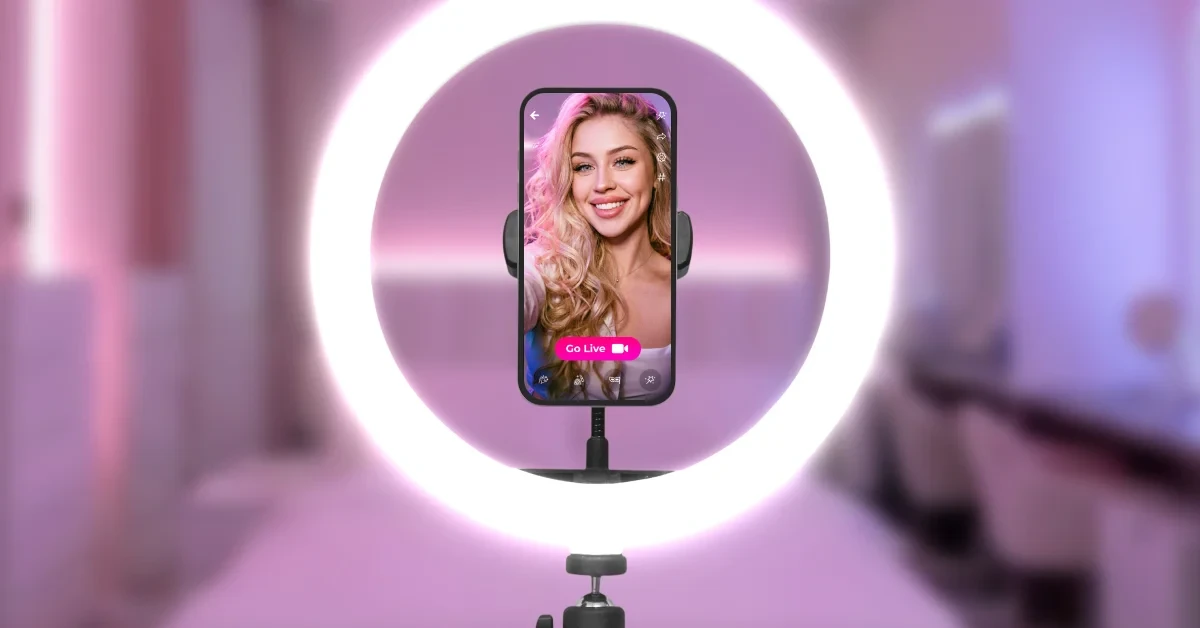
Sign up, create your profile, and schedule a simple first stream. You don’t need a perfect plan, just a clear idea, a bit of courage, and a willingness to learn as you go.
Download Tango to use the web app and experience the future of social video.
No perfect setup needed - it just takes YOU to Tango!
Maybe you like
Tango Categories
It Takes U to Tango
Discover how to get more from Tango, whether you're starting a video chat, meeting new people or exploring live streams. These practical guides cover the tools, features and tips that can help you connect, interact and make the most of your experience.
You’ll also find practical guidance for creators who want to go live, engage viewers and grow their presence on Tango. Explore tips for better video chats and live streams, along with guides to viewer engagement, gifts, coins and diamonds, creator tools and building an active community.
Keep Up with Tango
Get the latest articles, product news, and community stories delivered to your inbox.